
Member e-mails
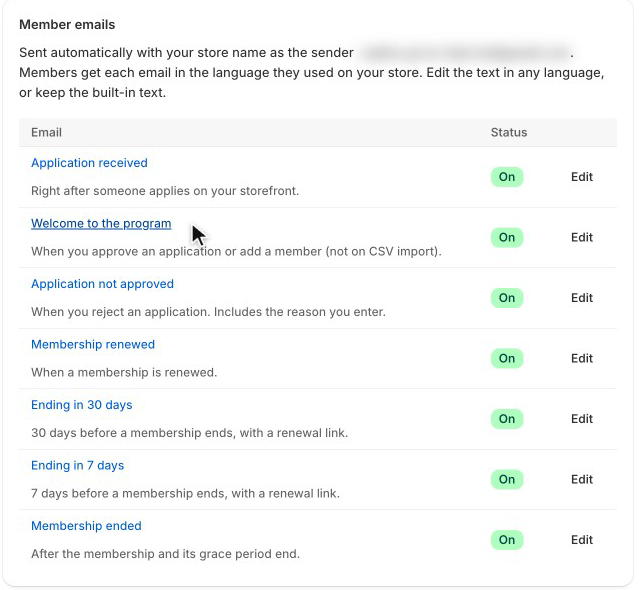
The app e-mails applicants and members for you. Open Settings → Emails to see the list, which e-mails are on, and which languages you've edited.
| Sent | |
|---|---|
| Application received | Right after someone applies on your storefront (not when they're approved automatically by domain or code — they get the welcome e-mail instead). |
| Welcome to the program | When you approve an application or add a member (not on CSV import). |
| Application not approved | When you reject an application. Includes the reason you enter. |
| Membership renewed | When a membership is renewed. |
| Ending in 30 days | 30 days before a membership ends, with a renewal link. |
| Ending in 7 days | 7 days before a membership ends, with a renewal link. |
| Membership ended | After the membership and its grace period end. |
Memberships without an end date get no reminders. Reminders and the "ended" e-mail go out once a day; each e-mail is sent only once per membership period.
E-mails come from notify@mail.lilya.work with your store's name as the sender name ("Lilya Pro Program – Your Store"), and replies go to your store's contact e-mail. They're plain text, without tracking or marketing.
Edit an e-mail
Select an e-mail in the list.
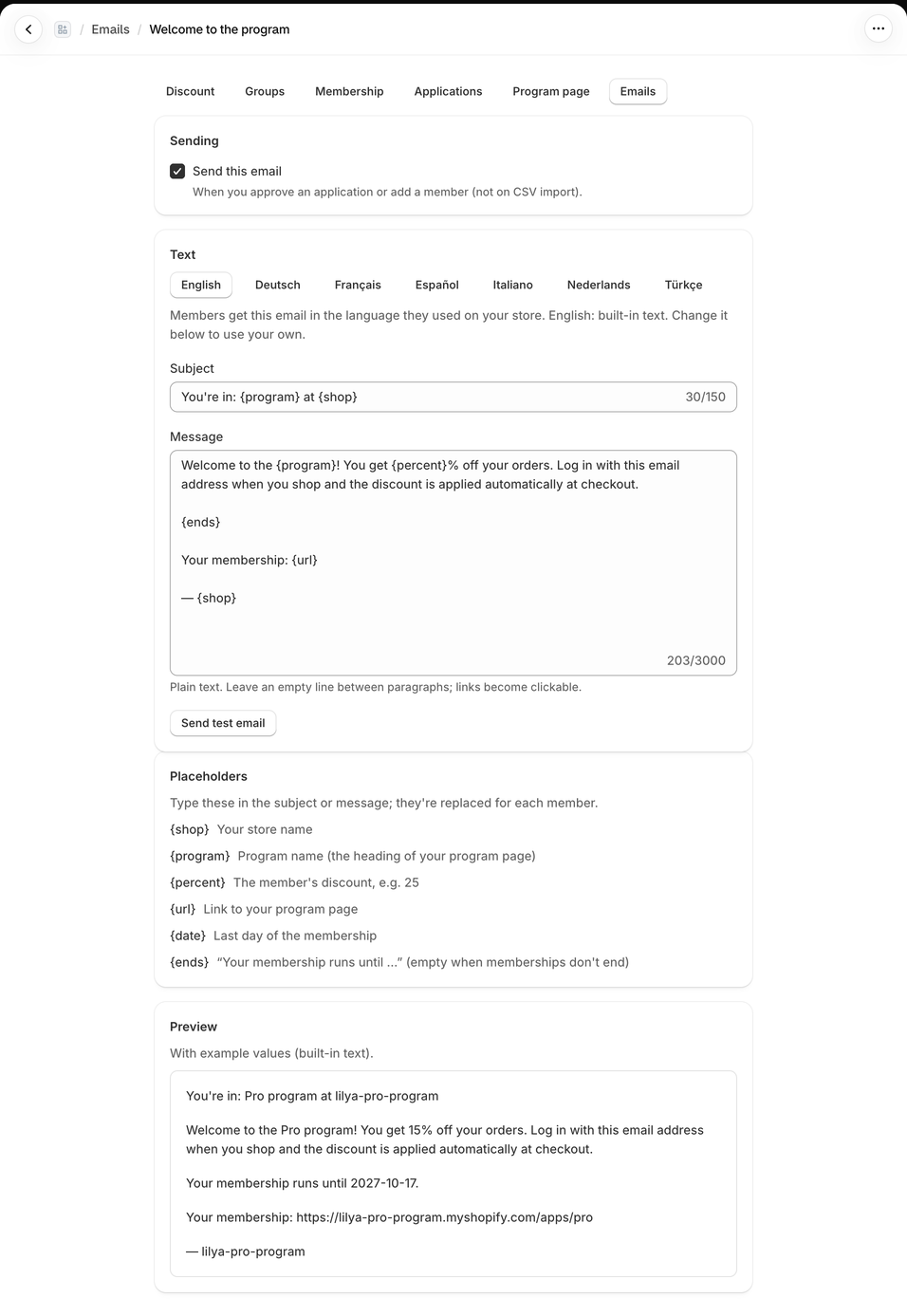
- Sending: Send this email on or off.
- Text: choose the language (English, Deutsch, Français, Español, Italiano, Nederlands, Türkçe), then change the Subject and the Message. Plain text: leave an empty line between paragraphs; links become clickable.
- Preview shows the e-mail with example values.
- Save in the save bar.
Each applicant or member gets the e-mail in the language they used on your storefront. Languages you haven't edited use the built-in text. Use built-in text goes back to it for the selected language.
Send test email sends the e-mail as shown to your store's contact e-mail.
Placeholders
| Placeholder | Becomes |
|---|---|
{shop} | Your store name |
{program} | Program name (the heading of your program page) |
{percent} | The member's discount, for example 25 |
{url} | Link to your program page |
{date} | Last day of the membership (welcome, renewed, reminders, ended) |
{ends} | "Your membership runs until …", empty when memberships don't end (welcome, renewed) |
{note} | The reason you enter when rejecting (not approved) |
An unknown placeholder, for example {first_name}, shows "Unknown placeholder" under the field and can't be saved.
Example: a friendlier welcome
Subject:
Welcome to {program}, you're in!Message:
Thanks for joining {program} at {shop}. You get {percent}% off every order: log in with this email address when you shop and the discount is taken off automatically at checkout.

{ends}

See your membership any time: {url}
For a member with 25 % who joined on March 5, the message reads "…You get 25% off every order…" and "Your membership runs until …" with their end date.
Common questions
Can I send the e-mails from my own address? No. They come from notify@mail.lilya.work with your store name as the sender name. Replies go to your store's contact e-mail, so members can answer you directly.
Can I add my logo or HTML? No. The e-mails are plain text, so they look the same in every mail program.
I edited the German text. What do English members get? The built-in English text, until you edit English too.
A member says they never got the welcome e-mail. Members you imported get no welcome e-mail. Otherwise, see E-mails don't arrive.
Shopify Flow
For anything else — a Klaviyo list, a customer tag, a Slack message — use the app's Flow triggers: Pro membership started, Pro membership renewed, Pro membership ending soon, Pro membership expired and Pro membership cancelled. Each one carries the customer, the End date and the Source (application, manual, import, domain, code or renewal).