
Pro Program & Discounts
Lilya: Pro Program & Discounts runs a pro or trade discount program on your online store. Professionals — instructors, guides, coaches, designers, trade buyers — apply on your store. You approve or reject each application, and approved members get an automatic discount at checkout until their membership ends.
Members are ordinary Shopify customers. The app keeps each membership (status, end date, discount, allowance left) on the customer in your store, and Shopify's checkout reads it: the discount applies when a member is logged in with the e-mail address they applied with, and stops on its own when the membership and its grace period end.
Where to find things
| Place | Use it for |
|---|---|
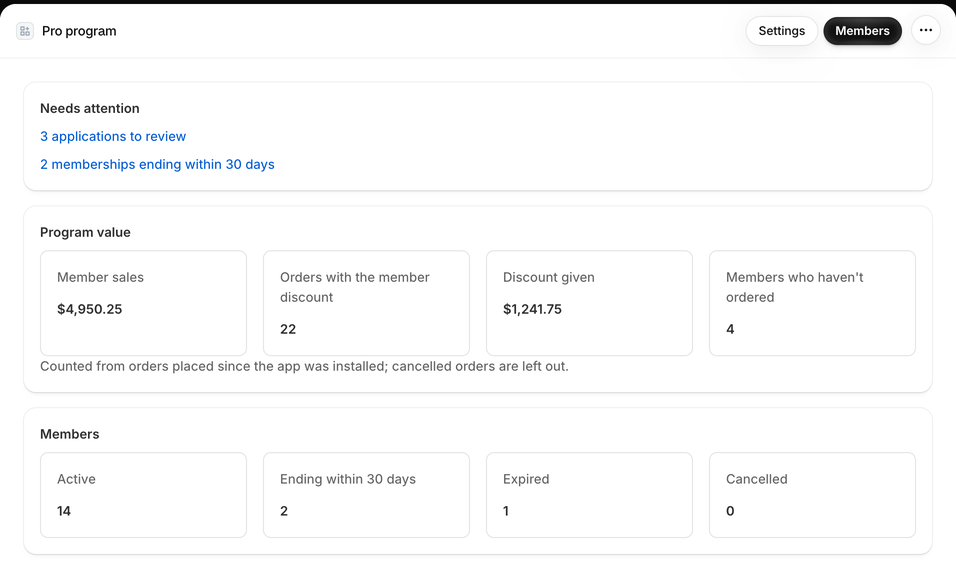
| Shopify admin → Apps → Lilya: Pro Program & Discounts (home) | Setup guide until setup is done, Needs attention (applications to review, renewal requests, memberships ending soon, members in the grace period), Program value, Members counts, and your Plan. |
| Applications | Applications from your store: To review, Approved, Rejected. Open one to see the answers and proof files, then Approve or Reject. |
| Members | Every member with search, Show and group filters, Add member, Import members, and Export CSV. Select a member to renew, change the end date, set a personal discount, write a note or cancel. |
| Settings | Six tabs: Discount, Groups, Membership, Applications, Program page, Emails. |
| Online store → /apps/pro | Your program page: the application form, the "being reviewed" message, and the member's own status and renewal request. |
| Theme editor → Apps | The Pro program application block (the form on any page) and the Pro member price block (product pages). |
| Customer accounts → Profile | The Pro membership block: status, end date, allowance left and a renewal link. |
| Shopify Flow | Triggers when a membership starts, is renewed, is ending soon, has expired or is cancelled. |
How it works
- A professional opens your program page (
/apps/pro, or your own page with the form block), fills in the form and, if you ask for it, uploads proof such as a certificate or work ID. - The application appears under Applications → To review and on the app home under Needs attention. You open it and select Approve or Reject. Applicants with an e-mail at one of your domains, or with one of your invite codes, are approved automatically.
- The member gets the Welcome to the program e-mail. From now on, when they're logged in, their discount is taken off at checkout automatically — no code to type.
- Before the membership ends they get reminders 30 and 7 days ahead, with a link to request renewal. You select Renew (or approve the renewal request) and the next period starts.
- If nobody renews, the discount stops after the end date and the grace period, and the member gets Membership ended.
Two example programs
A ski and snowboard shop. The program discount is 15 %. Groups: Instructors 25 %, Athletes 10 %, Shop staff 30 %. The form asks for the company (ski school or club), the role, and a proof document, and applicants pick their group. Memberships last 12 months. One key account, a ski school director, gets a personal discount of 35 % on her member page. A Most units of one product a member can buy per order of 2 stops members from buying in bulk for friends. See Groups and discounts.
An interior design trade program. One discount of 20 % for everyone, no groups. Designers from two partner studios are approved automatically by their e-mail domain; everyone else uploads a business certificate and waits for review. Memberships run Until the same date every year (season end), 12-31, so everybody renews at the same time. Trade-only fabric samples carry the tag pro-only. See Settings.
Watch the walkthrough
A narrated, 4-minute walkthrough with English captions: the discount, member groups, membership length, the application form, the form and price blocks in the theme editor, customer accounts, applying and approving, e-mails, checkout, the member page, checkout rules, import and export, and plans.
Limits to know
- The member must be logged in to get the discount. Guests can apply if you allow it, but they log in with the same e-mail when they shop.
- Checkout rules (products only members can buy, units per product) work at online checkout only. They don't run in Shopify POS, on draft orders or on order edits.
- The admin and the customer account block are in English. The program page, the form block and the member e-mails are in English, German, French, Spanish, Italian, Dutch and Turkish.
Common questions
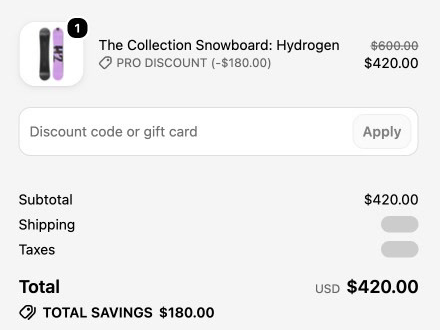
Do members need a discount code? No. The discount is automatic for logged-in members. It appears in the cart and at checkout under the name you choose, for example "Pro discount".
Can a member have a different discount from the rest? Yes: put them in a group or give them a personal discount on their member page.
Can I bring members from another app or a spreadsheet? Yes, with CSV import. Imported members don't get a welcome e-mail.
What does it cost? Free for up to 10 active members, with every feature. See Plans.
Start with the quick start.