
Create a batch
Create batch has three steps: Discount, Codes, and Review. Your work is kept while you move between steps; if you leave and come back, the app offers to restore it or Start over.
Discount
Choose where the codes go:
| Option | When to use it |
|---|---|
| Quick setup | Create a new discount in the app: percentage, fixed amount, free shipping, or Buy X Get Y, for the entire order, specific collections, or specific products. Set a minimum purchase, usage limits, active dates, and combinations under More options. |
| Use Shopify's discount editor | You need an option the quick setup does not offer, such as customer segments, markets, or sales channels. Shopify's editor opens; save the discount there and come back to add codes. |
| Add codes to an existing discount | Add codes to a code discount you already have, including discounts made by other apps. Unlimited plan. |
Usage limits default to one use per code and one use per customer. Shopify applies these limits to each code separately, so one customer can still use two different codes from the same batch. Give each customer one code.
Codes
Generate random codes
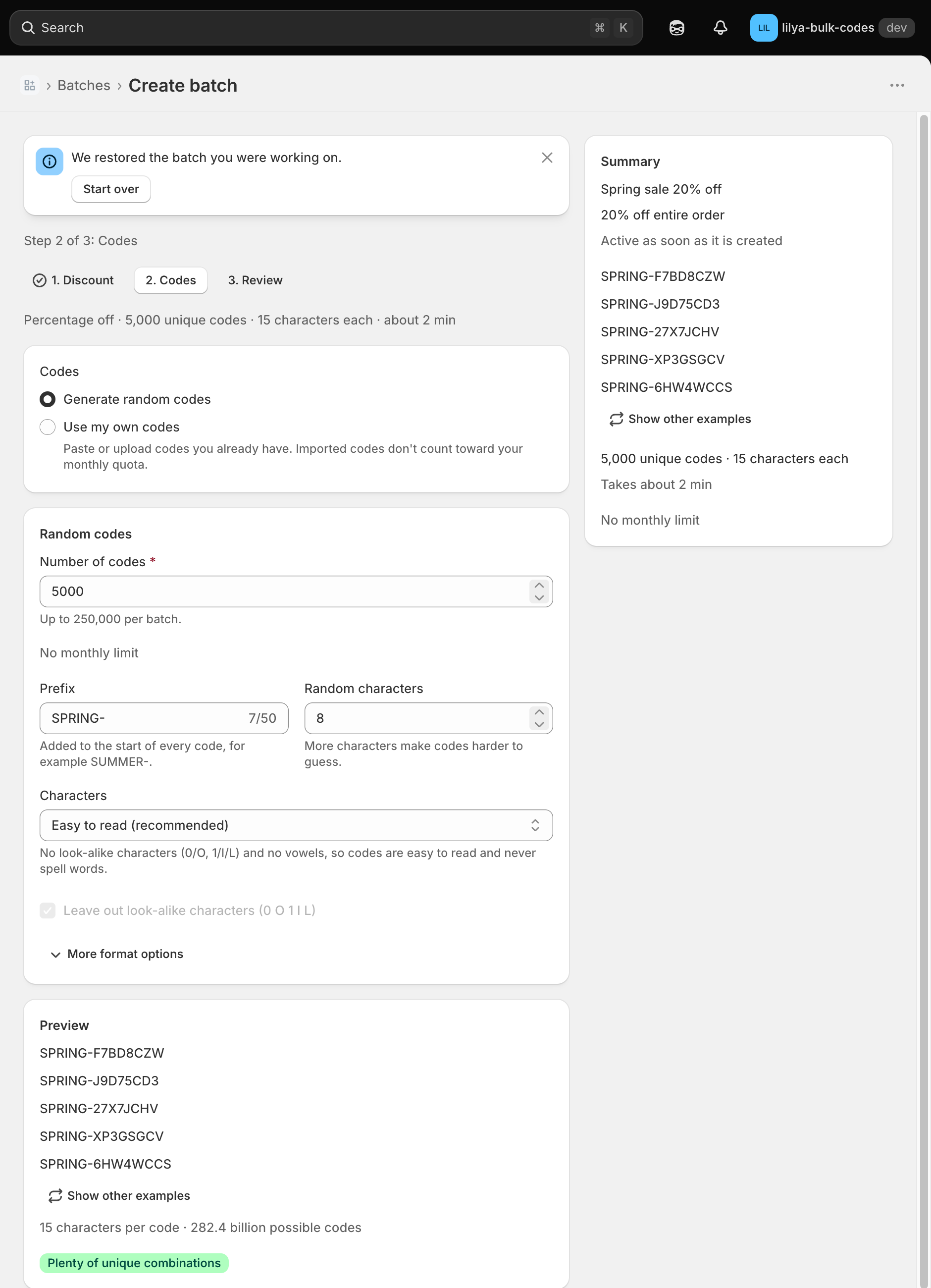
Enter the Number of codes (up to 250,000 per batch, within your plan's monthly limit) and shape the format:
- Prefix and Suffix are added to every code, for example
SUMMER-. - Random characters sets the length of the random part (4–32).
- Characters: Easy to read (recommended) leaves out look-alike characters (0/O, 1/I/L) and vowels, so codes are easy to type and never spell words. You can also choose letters and numbers, letters only, numbers only, or custom characters.
- More format options: split the random part into groups with a separator, or Use a pattern instead, such as
SUMMER-####-XXXX.
The preview shows example codes and how many different codes the format allows. If the format is too small for the number of codes, the app tells you before you create the batch.
Use my own codes
Paste codes, one per line (up to 10,000), or upload a CSV, text, or Excel file (up to 10 MB and 250,000 codes). The app removes duplicates and lists codes Shopify would not accept. Codes can be 1–255 characters: letters, digits, - and _. Imported codes don't count toward your monthly limit.
Review
Check the discount, the codes, and the estimated time, then select Create. On the Pro plan you can choose On a date under Create the codes to create them later; your monthly limit is checked when the batch starts.
While a batch runs
The batch page shows Queued, Generating, Adding to Shopify, and the final status. Shopify adds codes in groups of 250; about 1,000 codes take under a minute, 10,000 codes about 5 minutes, and 250,000 codes about 1.5 hours. You can Cancel batch while it runs; codes already added stay in the discount.
If a generated code already exists in your store, the app replaces it automatically. If some codes still can't be added, the batch ends as Partially completed and lists them under Codes that weren't added with the reason.