
Appearance
Consent records
Every accepted checkout writes consent attributes to the cart. Shopify copies them to the order's Additional details. Look there for consent_accepted: yes, the consent version and source, and optional time and record ID.
Enhanced record keeping
Under Settings → Record keeping, choose Enhanced: order details + server record to create a separate record when the customer ticks the box. The app adds its ID to the cart and order. Open Consent records to search by that ID, view the stored server time, version, revision, text fingerprint, source, language, and a snapshot of the published wording. You can export a CSV for a date range.
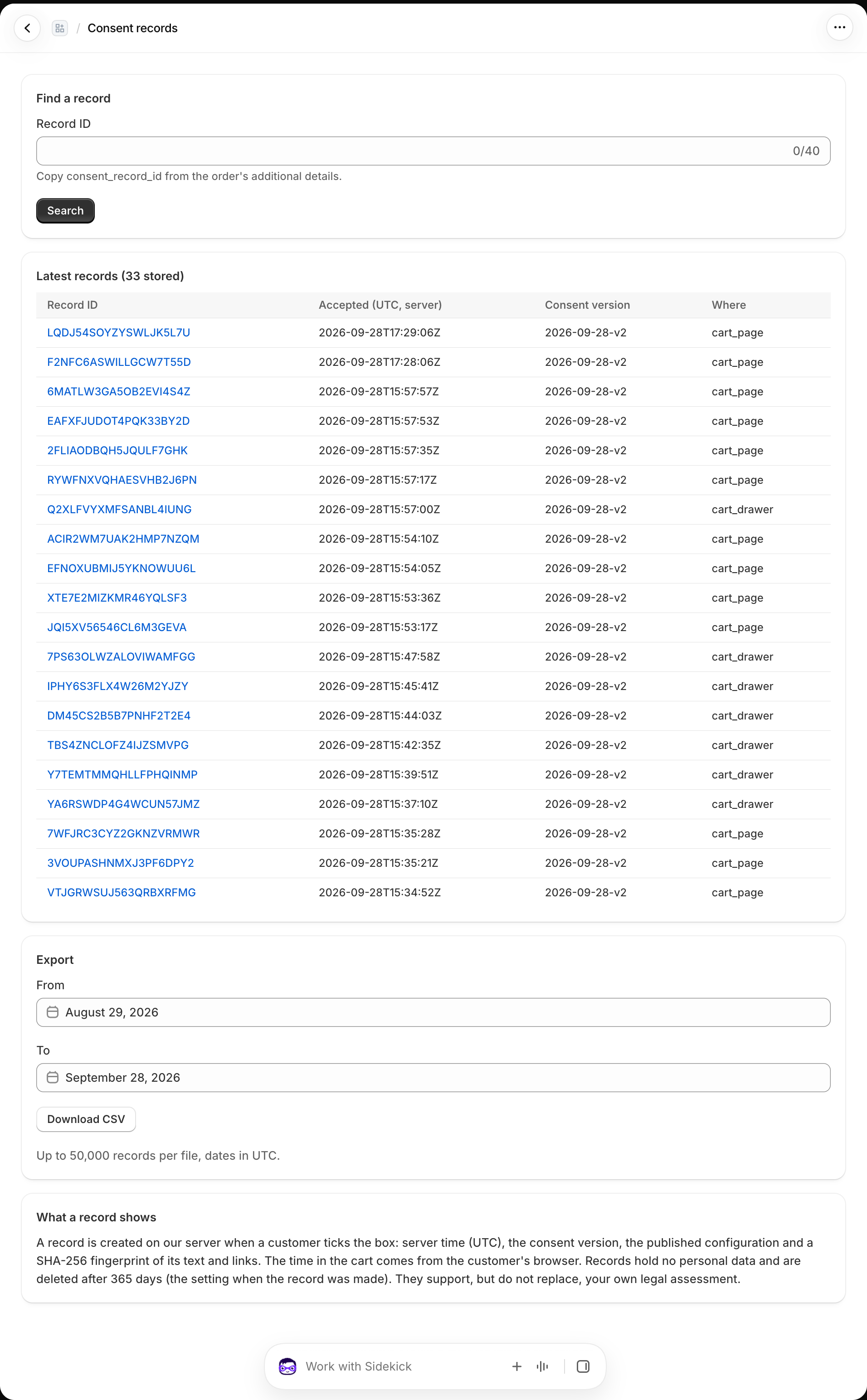
The default retention is 365 days; Settings allows 30 to 3,650 days. Each record keeps the expiry selected when it was created. The app does not store the customer's name, email, IP address, customer ID, cart token, or order ID in these records. The consent_record_id in Shopify's order details is the link between an order and a record.
Evidence limits
The server record shows that a browser requested a record for a particular published text at a server time. It does not identify the person who ticked the box or provide tamper-proof proof of consent. The checkout rule can check the record ID's format, but cannot query the server during checkout.
With Standard record keeping, use the order's Additional details; no searchable server record is created. For channel coverage, see Where consent works.